Graph Intelligence — How the Graphs Were Built
To understand the harness we ran two local, no-API-key code-intelligence tools over
the repository and used their output to drive the diagrams and the module map. Their raw
exports live under tool-outputs/.
These tools read all the code and build a map of how everything connects — which function calls which, which file imports which. That map is what let us draw an accurate "module dependency" picture instead of guessing, and it is exactly the kind of index an AI coding assistant can query to answer "how does X work?" without re-reading the whole codebase every time.
What we ran (locally, in the sandbox)
CodeGraph (@colbymchenry/codegraph)
A tree-sitter + SQLite knowledge-graph builder. We indexed the repo and exported the results.
| Metric | Value |
|---|---|
| Files indexed | 336 (327 Python + 9 YAML) |
| Nodes | 5,992 (2,846 functions · 276 methods · 228 classes · 1,576 imports · …) |
| Edges | 15,323 (5,665 contains · 5,474 calls · 2,325 imports · 1,004 references · 841 instantiates) |
Outputs: tool-outputs/codegraph/ — the SQLite DB
(db/), files.json, status.txt, and module_dependencies.json (the aggregated
package-to-package edges that power the module dependency diagram in
diagrams/04_module_dependencies.svg).
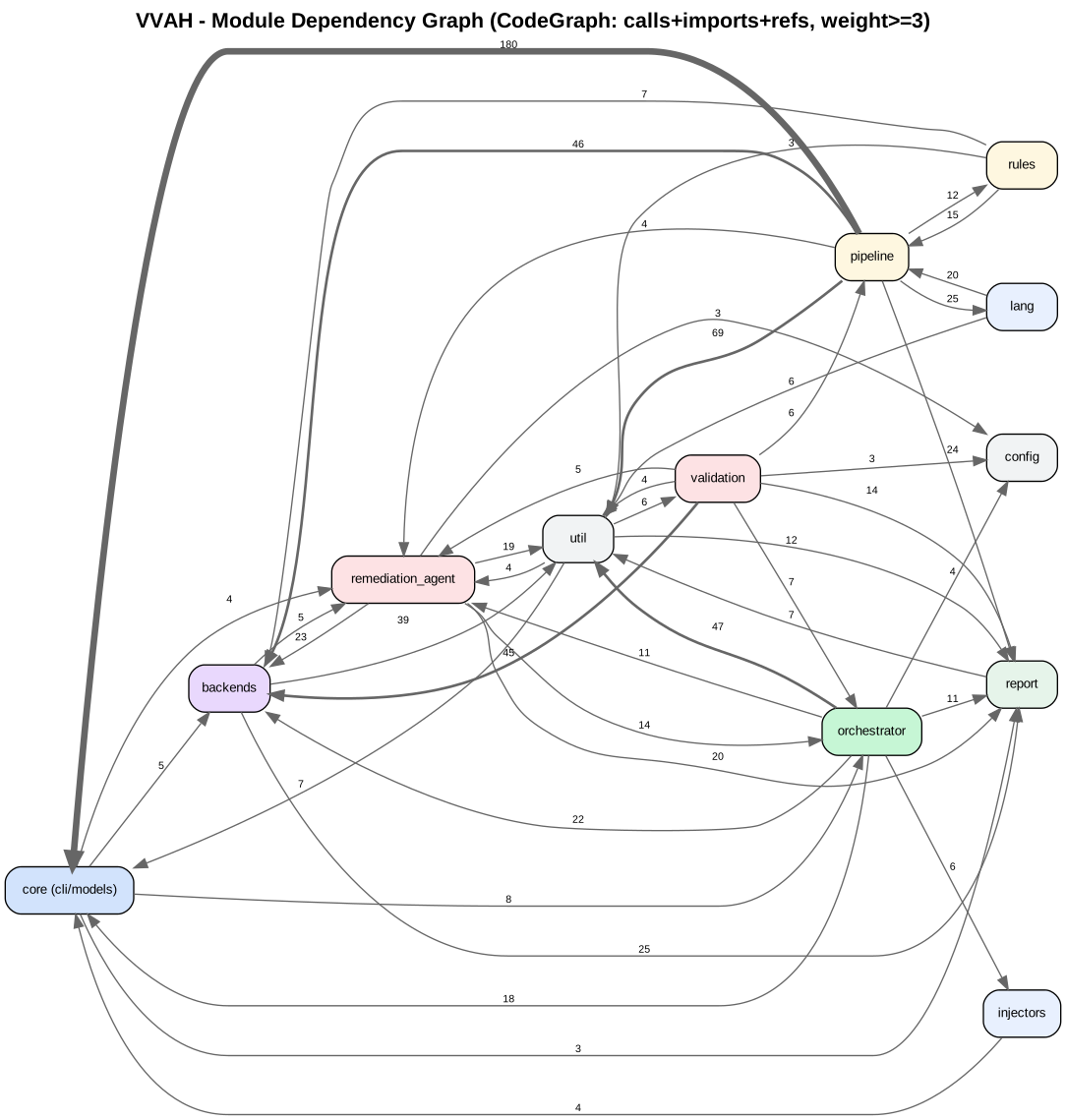
Highest-connected ("god") symbols confirm the design: scan_repo (orchestrator entry),
_scan.py/_graph.py (the call-graph engine), redact (report boundary),
launcher.py (validation session), s3_decompose/s4_deepdive (pipeline core).
Graphify (graphifyy)
A NetworkX + Leiden + tree-sitter knowledge-graph builder that also emits an interactive HTML view and a report. We ran the code (AST) pass with clustering.
| Metric | Value |
|---|---|
| Nodes | 5,112 |
| Edges | 12,150 |
| Communities | 200 |
| Extraction quality | 97% EXTRACTED · 3% INFERRED |
Outputs: tool-outputs/graphify/ — GRAPH_REPORT.md,
graph.json, analysis.json, and the raw graph.html.
On Graphify's "Community N" clusters. Graphify groups the 5,112 symbols into 200 "communities" (code that calls each other a lot). Run without the optional LLM naming step, those clusters are unnamed ("Community 180, 181…") and unreadable. We therefore derived human names for every cluster deterministically — from each cluster's dominant module plus its representative classes/functions — and produced a readable view:
tool-outputs/graphify/labeled-clusters.html(e.g. "model transport · options [ToolPolicy]", "detection pipeline · _scan [CFG, CFGNode]"). A data copy with names applied is saved asgraph.labeled.json. Regenerate withpython tools/codeviz/gen_graphify_labels.py.
Readable interactive views we built
Because the raw graph exports are dense, we built human-navigable views (all use native
HTML <details>, so they expand with or without JavaScript):
| File | What it gives you |
|---|---|
diagrams/module-graph.html |
12-module flow; click a box to expand input/output/role. |
tool-outputs/codeviz/vvah-codeviz.html |
Full drill-down: module → file → function, plain-English notes. |
tool-outputs/codeviz/vvah-stage-explorer.html |
Pipeline S0–S11 → implementing files → functions. |
tool-outputs/graphify/labeled-clusters.html |
Graphify's 200 clusters, each with a human name. |
The reusable generator is tools/codeviz/ (codeviz.py works on any
Python repo; see its README).
The two tools we did not run here (need your local setup)
Both are designed to run inside your own AI client with local providers. Copy-paste setup below; run them against a local clone of the repo.
Serena (oraios/serena) — LSP-backed semantic code tools
Serena needs language servers (e.g. a Python LSP) and is driven by an LLM over MCP.
# 1. Install (uv is the only prerequisite)
uv tool install -p 3.13 serena-agent
serena init

# 2. Point your MCP client (Claude Code / Cursor / etc.) at Serena, then in the project:
#    ask your agent to use Serena's find_symbol / get_symbols_overview / find_referencing_symbols
#    over the vvaharness/ package for symbol-level navigation and safe refactors.
Value here: precise symbol overviews and cross-file reference lookups on top of the
Python language server — ideal for a developer changing a shared contract in models.py.
grepai (yoanbernabeu/grepai) — semantic code search
grepai needs an embedding provider (Ollama by default, or OpenAI).
# 1. Install + an embedding model
brew install yoanbernabeu/tap/grepai      # or: curl -sSL https://raw.githubusercontent.com/yoanbernabeu/grepai/main/install.sh | sh
ollama pull nomic-embed-text

# 2. Index and query the repo semantically
cd visa-vulnerability-agentic-harness
grepai init
grepai watch &
grepai search "where are secrets redacted before output"   # → report/redact.py
grepai search "adversarial validation of a proposed fix"    # → validation/subagents + scoring
grepai trace callers "scan_repo"
Value here: ask questions by meaning ("authorization checks", "majority voting") and get the relevant code, even when names differ — and far fewer tokens for an AI agent.
How to refresh these graphs after code changes
# CodeGraph (native OS file watcher keeps it fresh; or:)
codegraph index /path/to/repo --force

# Graphify (no LLM needed for the code AST pass)
graphify update /path/to/repo --no-cluster
graphify cluster-only /path/to/repo --no-label     # rebuild report + html
These four tools all target the same goal from different angles: turn a large codebase into a queryable graph so humans and AI agents can navigate it cheaply. CodeGraph and Graphify gave us the concrete numbers and the module map on this page; Serena and grepai shine when wired into your own agent for day-to-day navigation and refactoring.