Start Here — Open Code Review (OCR) Onboarding Guide
Welcome. This documentation set explains Open Code Review (OCR) — Alibaba's open-source AI code review CLI — for new joiners: analysts, junior developers, and non-technical stakeholders alike.
It follows the same documentation methodology used for the Visa Vulnerability Agentic
Harness (VVAH) project: every design doc is split into a plain-English first half (with
a data-flow diagram) and a technical second half (with per-package detail), and the
interactive architecture.html has a Simple/Technical toggle that changes every
description on the page at once — so read at whichever depth you need.
Pick your path
| You are… | Read, in order |
|---|---|
| Non-technical (PM, analyst, manager) | architecture.html (Simple mode) → Overview |
| Security analyst | Overview → Data Flow → HLD §4 Trust Boundaries |
| Junior developer | HLD → LLD → Data Flow → Module docs → architecture.html §7 (Technical mode) |
| Reviewer / architect | HLD → LLD → Graph Intelligence → tool-outputs/ (real dependency data) |
Operator (wants to run ocr, not just understand it) |
Process & Runbooks index → Setup & Credentials → Run a Review or Scan |
All of the Markdown pages above also ship as standalone, styled .html copies
(docs/01_overview.html, docs/design/HLD.html, docs/design/LLD.html,
docs/design/data-flow.html, docs/modules/README.html,
docs/tools/graph-intelligence.html) — same visual language as architecture.html, same
shared design tokens (tools/design-system/tokens.css, copied verbatim from the Visa
project's kit), Mermaid diagrams rendered live via CDN. Open the .html if you'd rather
read in a browser than a Markdown viewer; the .md is always the source of truth —
regenerate every .html after editing with python3 tools/gen_design_html.py.
What's in this folder
Alibaba -Open COde Review/
├── architecture.html            ← interactive explainer (START HERE, non-technical friendly)
├── docs/
│   ├── 00_START_HERE.md         ← this file
│   ├── 01_overview.md           ← what OCR is, why it exists, glossary
│   ├── design/
│   │   ├── HLD.md / HLD.html     ← High-Level Design (components, trust boundaries)
│   │   ├── LLD.md / LLD.html     ← Low-Level Design (cross-cutting internals)
│   │   └── data-flow.md / .html  ← DFD levels 0/1/2 + narrative
│   ├── modules/README.md/.html   ← per-package index (full narrative lives in architecture.html)
│   ├── modules/<pkg>.md/.html    ← 13 per-package docs (one per internal/ package)
│   ├── process/                  ← how to *operate* OCR (not just understand it)
│   │   ├── 00_process-and-runbooks-index.md
│   │   ├── process-operate-ocr.md    ← SOP: RACI, flow, exceptions, metrics
│   │   ├── process-optimization.md   ← waste analysis + improvement recommendations
│   │   └── runbooks/                 ← setup-and-credentials, run-a-review-or-scan, use-delegation-mode
│   └── tools/graph-intelligence.md/.html ← how the graphs were built (CodeGraph + Graphify)
├── diagrams/                     ← rendered SVG + PNG (architecture, DFDs, module graph) + module-graph.html
├── tool-outputs/                 ← real CodeGraph & Graphify graph exports + README index
├── tools/                        ← reusable generator scripts (regenerate docs/graphs after code changes)
└── samples/open-code-review/     ← pinned local clone of alibaba/open-code-review — the source of truth
The one-paragraph summary
OCR reads a git diff (ocr review) or whole files (ocr scan), hands each file to an AI
agent that can call tools (read other files, search the codebase) before writing a comment,
and checks every comment's line number against the real diff before accepting it. Its core
design bet is deterministic engineering + agent hybrid: file selection, rule matching,
and comment-location checking are plain code with zero model calls; only the actual
judgment of "is this a defect" is left to the AI. A third mode, ocr delegate, skips OCR's
own AI call entirely and hands file selection + rules to the user's own coding agent
(Claude Code, Codex, Cursor) — no OCR-managed API key needed.
OCR only ever reads the repository under review — no mode writes back to your code.
ocr review/ocr scando send diff/file content to your configured LLM provider over HTTPS;ocr delegatesends nothing to an OCR-configured provider at all.
Diagram index
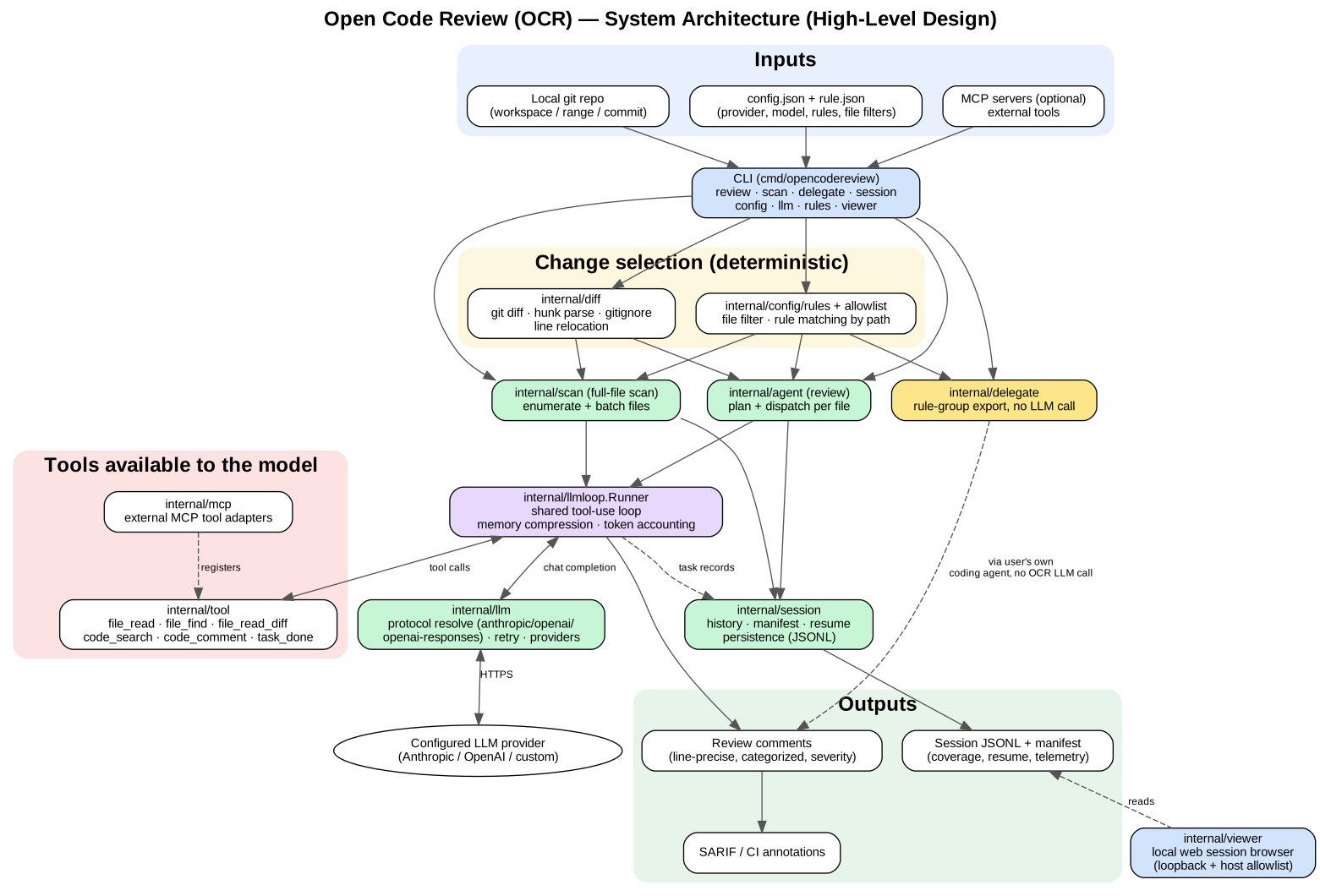
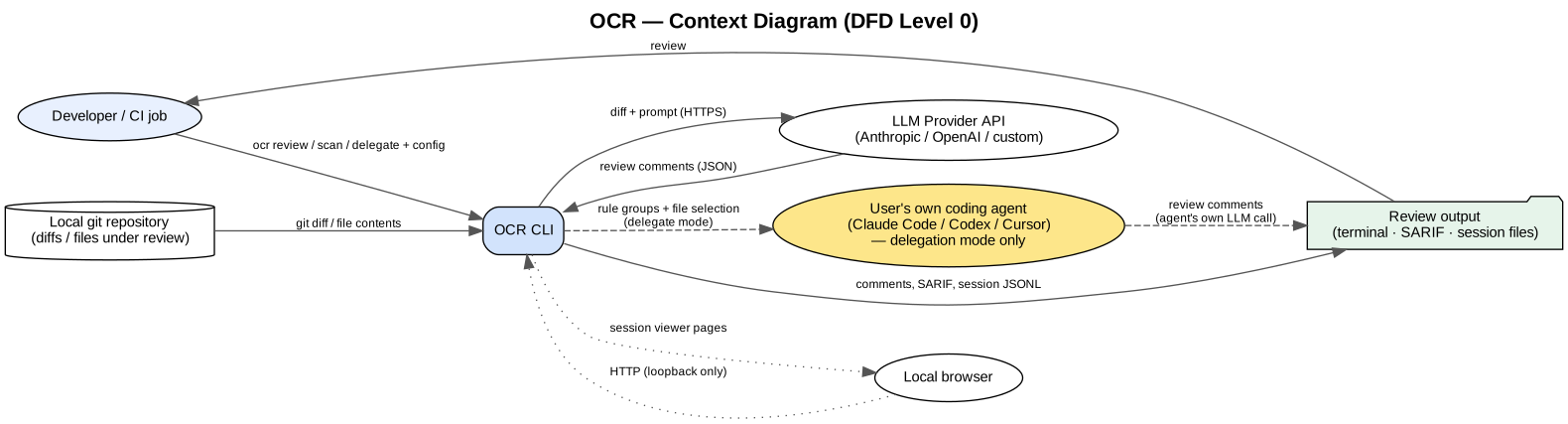
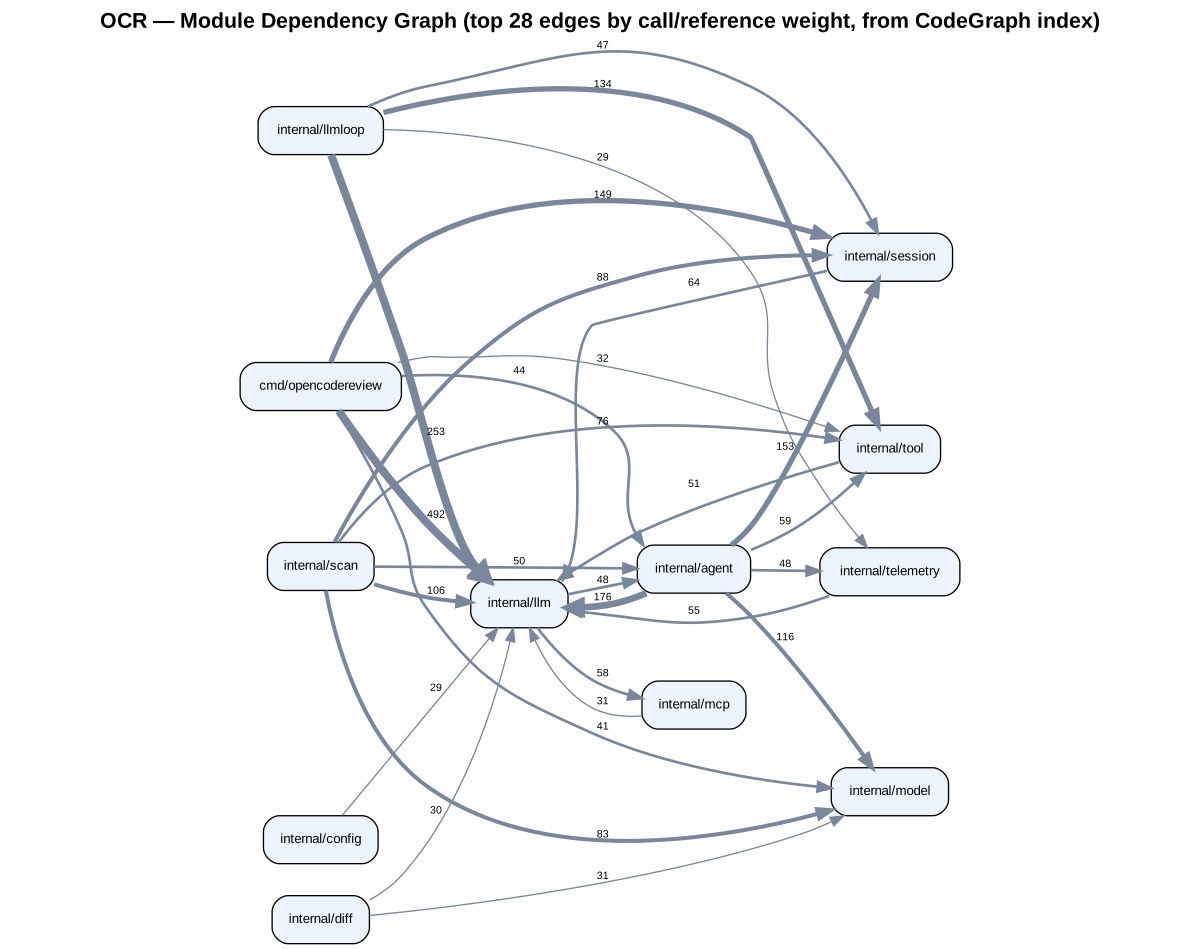
diagrams/01_architecture.svg— system architecture (HLD)diagrams/03_context_dfd.svg— context diagram (DFD L0)diagrams/02_dataflow_pipeline.svg—ocr reviewdata flow (DFD L1)diagrams/05_scan_and_delegate.svg—ocr scan/ocr delegateflowdiagrams/04_module_dependencies.svg— module dependency graph (from real CodeGraph data)


Regenerating after a code change
# 1. refresh the pinned source clone
rsync -a --exclude .git <path-to-open-code-review-repo>/ samples/open-code-review/

# 2. refresh graph data (see docs/tools/graph-intelligence.md for the local-disk caveat)
python3 tools/gen_module_dependencies.py --db <local>/.codegraph/codegraph.db \
  --out tool-outputs/codegraph/module_dependencies.json

# 3. re-render diagrams (edit diagrams/src/*.dot first if structure changed)
for f in diagrams/src/*.dot; do
  b=$(basename "$f" .dot)
  dot -Tsvg "$f" -o "diagrams/$b.svg"
  dot -Tpng -Gdpi=150 "$f" -o "diagrams/$b.png"
done

# 4. regenerate the interactive explainer (edit tools/generate_architecture_html.py's
#    MODULES/SECTIONS/STAGES first if the narrative changed)
python3 tools/generate_architecture_html.py

# 5. regenerate the styled HTML copies of every design/module Markdown doc
#    (edit the .md first — never hand-edit the .html output)
python3 tools/gen_design_html.py